No Code, No Problem? What to Do When Your McDonald's Receipt Won't Get You Into the Survey

Photo: Paul Mannix, CC BY 2.0, via Wikimedia Commons
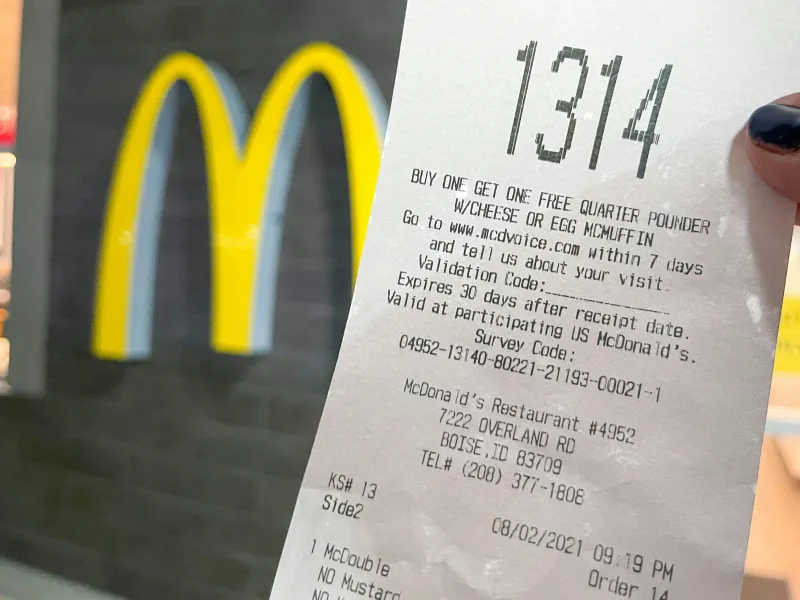
It's one of those small frustrations that feels weirdly personal. You just had a McDonald's experience worth talking about — maybe great, maybe not so great — and you're ready to actually fill out the McDVoice survey. You flip over the receipt. And the code is either missing entirely, printed so faintly it's basically invisible, or smeared into an abstract blur that no human being could decipher.
Congratulations. You've hit one of the most common dead ends in the McDonald's feedback ecosystem.
The good news? You're not completely out of options. The bad news? Getting around this particular obstacle takes a little more effort than just punching in a code. Let's walk through what's actually going on and what you can do about it.
Why This Happens More Than It Should
First, let's be clear: this is not a rare edge case. Illegible and missing receipt codes are a widespread, ongoing issue across McDonald's locations nationwide — and the reasons vary by franchise.
The most common culprit is thermal printer maintenance, or the lack of it. McDonald's uses thermal receipt printers at most locations, which rely on heat-sensitive paper rather than ink. When the print head wears down, gets dirty, or runs low on heat output, the result is a receipt that looks fine at first glance but fades into near-invisibility within minutes — or prints so lightly the code is unreadable from the start.
Some locations are worse than others because franchise operators control their own equipment upkeep schedules. A high-volume location that runs its printers hard without regular maintenance is going to churn out bad receipts far more often than one that stays on top of things.
Then there's the paper stock issue. Thermal paper has a shelf life, and using old or improperly stored rolls can produce receipts that look fine initially but fade fast when exposed to heat, light, or even the oils on your fingertips. Ever notice how a receipt gets harder to read after it's been sitting in your car on a hot day? Same principle.
Finally, some locations simply don't print the survey code at all — either because their receipt template is misconfigured, or because the location has temporarily opted out of the survey program during certain operational periods. It happens, and it's frustrating.
The Receipt Photography Trick (Do This Before You Throw It Away)
Here's a habit worth building: photograph your receipt immediately after you get it, before you leave the restaurant. Not because you're paranoid, but because thermal paper fades fast and a photo locks in whatever's printed at peak readability.
For best results:
- Use your phone's camera in good lighting, ideally near a window or under bright overhead lights rather than in a dim car interior.
- Zoom in on the survey code section specifically and make sure the digits are sharp before you pocket the receipt.
- Try your phone's document scanner mode if the standard camera isn't capturing the faint text clearly. Apps like Google PhotoScan or even the built-in iOS document scanner can sometimes enhance contrast enough to pull out nearly-invisible print.
- If the code is still unreadable in the photo, try adjusting brightness and contrast in your phone's photo editor. It sounds low-tech, but it works more often than you'd expect.
Going Digital: The Receipt Alternative You Might Not Know About
A growing number of McDonald's locations now offer digital receipts through the McDonald's app. If you ordered through the app or paid at the kiosk while logged in, there's a reasonable chance your receipt is waiting for you in your order history — complete with the survey code, fully legible, no thermal paper required.
Check the app under your recent orders. If the code is there, you're back in business.
For drive-thru or counter orders placed without the app, some locations have started offering email receipt options at the point of sale — you'll see a prompt on the payment terminal or the cashier may ask. Saying yes to that option gives you a clean digital copy that doesn't fade.
If your location doesn't offer digital receipts yet, it's worth asking the crew member directly. It puts the request on record, and enough customers asking tends to accelerate the rollout.
When the Code Is Gone: Escalating Through Alternative Channels
So you've tried everything. The receipt is unreadable, there's no digital backup, and you have feedback you genuinely want to submit. Here's what you can still do:
Contact McDonald's Customer Service directly. The McDonald's customer service line (1-800-244-6227) accepts feedback without a survey code. It's a slower path, but your comments go into the system. Be ready with the date, time, and location of your visit — that information helps route your feedback to the right franchise operator.
Use the McDonald's website contact form. Head to mcdonalds.com and look for the "Contact Us" section. The web form accepts general feedback and doesn't require a receipt code. Again, include as much detail about your visit as possible.
The McDonald's app feedback option. If you have the app, there's typically a feedback or help section that allows you to submit comments tied to your account history. If you made a purchase while logged in, the system can often match your feedback to the specific location automatically.
Talk to the manager on-site. It's old-school, but it works. If you're still at the restaurant when you realize the code is missing, asking to speak with a manager and noting the receipt issue accomplishes two things: it gets your immediate feedback heard, and it flags the printer problem so it might actually get fixed.
Locations That Are Repeat Offenders
If you visit the same McDonald's regularly and keep running into the bad-receipt problem, it's worth naming the location specifically when you escalate through any of the channels above. Franchise operators are accountable for maintaining equipment to corporate standards, and repeated complaints about illegible receipts from a single location can trigger an equipment audit.
You're not being petty. You're doing exactly what the feedback system is designed for — surfacing operational problems that aren't visible from the inside.
The Bigger Picture
A missing survey code isn't just an inconvenience for you. It's a gap in McDonald's feedback data. Every customer who gives up after a bad receipt is a lost data point — and patterns of feedback that never get submitted can't drive improvements. That's bad for customers and, honestly, bad for the franchise system too.
The workarounds in this guide aren't perfect substitutes for a clean receipt code, but they're real paths to getting your voice into the system. And at McDVoice Survey Hub, that's what we're all about — making sure your experience, good or frustrating, actually gets heard.